
Showing posts with label InkJet. Show all posts
Epson Artisan 1430 Inkjet Printer drivers

Epson Artisan 1430 Inkjet Printer drivers

The Epson Artisan 1430 delivers brilliant, Hi-Definition prints as large as 13" x 19".  With its wireless capability , its easy to share to  Artisan 1430 through network connectivity. Anyone on your network can create large-size or even design and print professional looking CDs / DVDs directly to the printer. With its smudge, scratch, water and fade resistant because of the Claria® Hi-Definition Ink technology, the Artisan 1430 is a good choice for photo studio printing.

Printer Specifications

Printing Technology: 6-color advanced MicroPiezo inkjet technology optimized for photo printing
Minimum Ink Droplet Size: 1.5 picoliters
Maximum Print Resolution: 5760 x 1440 optimized dpi
ISO Print Speed:
  • Black: 2.8 ISO ppm
  • Color: 2.8 ISO ppm
Photo Print Speed:
  • 4" x 6" borderless photo in as fast as 46 sec
  • 8" x 10" borderless photo in as fast as 1 min 51 sec
  • 11" x 14" borderless photo in as fast as 2 min 53 sec
  • 13" x 19" borderless photo in as fast as 3 min
CD / DVD Printing: Inkjet printable CDs and DVDs

Paper Sizes: 4" x 6", 5" x 7", 8" x 10", A4 (8.3" x 11.7"), letter (8.5" x 11"), legal (8.5" x 14"), 11" x 14", 12" x 12", B (11" x 17"), A3 (11.7" x 16.5") and Super B (13" x 19")
Maximum Paper Size: User definable up to 13" x 44"
Borderless Sizes: Photo: 4" x 6", 5" x 7", 8" x 10", A4 (8.3" x 11.7"), letter (8.5" x 11"), 11" x 14", B (11" x 17"), 12" x 12" and Super B (13" x 19")
Paper Types:
  • Plain paper
  • EPSON® Bright White Paper
  • Photo Paper Glossy
  • Premium Photo Paper Glossy
  • Ultra Premium Photo Paper Glossy
  • Premium Photo Paper Semi-gloss
  • Ultra Premium Photo Paper Luster
  • Presentation Paper Matte
  • Premium Presentation Paper Matte
  • Ultra Premium Presentation Paper Matte
  • Ultra Premium Presentation Paper Matte Double-sided
Envelope Types: No. 10
Input Paper Tray Capacity:
  • 100 sheets (plain paper)
  • 20 sheets Premium Photo Paper Glossy

Ink Type: Claria® Hi-Definition Ink (smudge, scratch, water and fade resistant photos)3
Ink Palette: Black, Cyan, Magenta, Yellow, Light Cyan, and Light Magenta
Ink Cartridge Configuration: 6 individual ink cartridges
Fade Resistance / Print Longevity:
  • Up to 98 years under glass
  • Up to 200 years album storage

Connectivity/ Interface:
  • Hi-Speed USB 2.0
  • Wi-Fi CERTIFIED 802.11 (b/g/n)
  • Epson Connect™8: Epson iPrint™ Mobile App
Direct Camera Connection: PictBridge™ port (cameras / phones), Exif

Operating Systems Supported:
  • Windows® 8
  • Windows 7
  • Windows Vista®
  • Windows XP
  • Windows XP Professional x64 Edition
  • Mac OS® X 10.4.11, 10.5.x, 10.6.x, 10.7.x, 10.8.x7
Sound Level: 43 dB(A) per ISO 7779
Rated Voltage: 100 – 120 V AC
Dimensions:
  • Printing: 24.3" x 31.4" x 16.3" (W x D x H)
  • Storage: 24.3" x 12.7" x 8.5" (W x D x H)
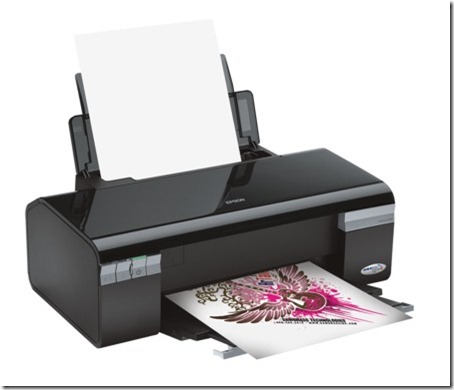
Epson Artisan 1430 Inkjet Printer Driver
Epson WorkForce Pro WP 4020 Inkjet  Drivers

Epson WorkForce Pro WP 4020 Inkjet Drivers

The WorkForce Pro WP-4020  efficient printer delivers high quality output while getting up to 50% less cost per page than color laser. Boasting two-sided print speeds of 9.2 ISO ppm (black) and 7.1 ISO ppm (color), the WorkForce Pro WP-4020 moves at your busy pace. It features a 330-sheet paper capacity and a built-in wireless networking, so it makes  easy to share your printer with others with the same network. The  direct mobile printing  ensures youll be able to print from  any room in your office.

Specifications

Printing Technology: 4-color (CMYK) drop-on-demand MicroPiezo® inkjet technology

Minimum Ink Droplet Size: 2 droplet sizes, as small as 3 picoliters

Maximum Print Resolution: 4800 x 1200 optimized dpi

ISO Print Speed:

  • Black: 16 ppm
  • Color: 11 ppm

2-Sided ISO Print Speed:

  • Black: 9.3 ppm
  • Color: 7.3 ppm

PC-Free Paper Support:

  • Plain (Letter, A4)
  • Photo (Letter, A4, 8" x 10", 5" x 7", 4" x 6",16:9 wide)

Paper Sizes: 3.5" x 5", 4" x 6", 5" x 7", 8" x 10", 8.5" x 11", A4, B5, A5, A6, half letter, executive, user definable (3.5" – 44" in length)

Maximum Paper Size: 8.5" x 44"

Paper Types:

  • Plain paper
  • Epson Bright White Paper
  • Brochure & Flyer Paper Matte Double-sided
  • Ultra Premium Presentation Paper Matte
  • Premium Presentation Paper Matte
  • Premium Presentation Paper Matte Double-sided
  • Presentation Paper Matte
  • Ultra Premium Photo Paper Luster
  • Ultra Premium Photo Paper Glossy
  • Premium Photo Paper Semi-gloss
  • Premium Photo Paper Glossy
  • Photo Paper Glossy
  • Photo Quality Adhesive Sheets
  • Iron-on Cool Peel Transfer paper

Envelope Types:

  • No. 10
  • Plain paper
  • Bond paper
  • Air mail

Input Paper Tray Capacity:

  • 330 sheets plain paper (250 sheets plain paper, 80-sheet rear-feed tray)
  • 10 envelopes

Secondary Paper Tray Capacity: 80-sheet rear-feed tray

Ink Type: DURABrite® Ultra pigment ink (smudge, fade and water resistant)

Ink Palette: Cyan, Magenta, Yellow and Black

Ink Cartridge Configuration: 4 individual ink cartridges

Fade Resistance / Print Longevity: Up to 118 years

Connectivity / Interface:

  • Hi-Speed USB 2.0
  • Wireless Wi-Fi (802.11 b/g/n)4
  • Wired Ethernet (10/100 Mbps)
  • Network Card Included
  • EPSON Connect™ Email Print
  • Apple® AirPrint™ enabled
  • Google Cloud Print™ ready

Supported Operating Systems:

  • Windows 8® (32-bit, 64-bit)
  • Windows 7 (32-bit, 64-bit)
  • Windows Vista® (32-bit, 64-bit)
  • Windows XP SP1 or higher (32-bit)
  • Windows XP Professional x64 Edition
  • Mac OS®5 X 10.4.11, 10.5.x, 10.6.x, and 10.7x
  • Windows Server® 2008 R2
  • Windows Server 2008
  • Windows Server 2003

Printer Language: Epson ESC/P® -R

Rated Voltage: 100 – 120 VAC

Dimensions:

  • Printing: 18.1" x 25.7" x 15.1" (W x D x H)
  • Storage: 18.1" x 16.5" x 11.2" (W x D x H)

Weight:

  • Printing: 18.1" x 25.7" x 15.1" (W x D x H)
  • Storage: 18.1" x 16.5" x 11.2" (W x D x H)

Epson WorkForce Pro WP-4020 Driver

Epson C120 Inkjet Printer Reset

Before opening the Epson adjustment program, make sure that the power of the printer is on, properly connected to your computer and most of all there’s no pending print task in your printer.
The Epson Stylus C120 Printer Model
Epson
Follow the steps below:
  • Open AdjProg.exe
  • Click Accept
  • Click Select button, and click your printer model
  • Click "OK"
  • Click the Particular Adjustment Mode
  • Select Waste ink pad counter
  • Click OK
  • Click Initialization (this will reset counter)
  • Turn off the printer
  • Then turn on again.
Finish

Click here to download the resetter
Epson SX130 and SX125 All In One InkJet Printer Reset

Epson SX130 and SX125 All In One InkJet Printer Reset

The error message appears "parts inside printer near end service life” or the message “parts inside printer end of service life”.  Before following the procedure, make sure that the printer is on, usb cord properly connected to your computer and most of all there’s no pending print task in your printer. Click here to download epson resetter. This program is compatible to EPson Printer with a model of Epson SX130 and SX 125, the Epson All in one Printer. Its better to used it in Windows XP  Desktop PC or Laptop Computer.

Follow the step by step guide  below:
  • Open AdjProg.exe
  • Click Accept
  • Click Select button, and click your printer model
  • Click "OK"
  • Click the Particular Adjustment Mode
  • Select Waste ink pad counter
  • Click OK
  • Click Initialization (this will reset counter)
  • Turn off the printer
  • Then turn on again.