Showing posts with label of. Show all posts
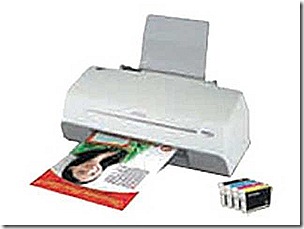
Epson Stylus L100 End of service Life Error

Epson Stylus L100 End of service Life Error

Repair the ERROR of Epson Inkjet  L100 printer parts inside printer near  end of service life, waste ink pad counter overflow error.

Follow the intructions below to reset the protection counter
Download Windows Xp, Windows 7 32 bit reset program: the Epson Resetter 

Open the program
  • Click “Accept” button to open the program
  • Click “Select” button. and choose your printer model then click “OK”
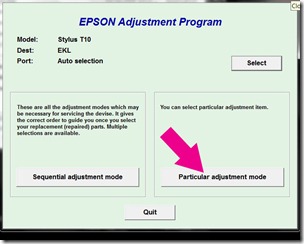
  • Click “Particular adjustment mode” button
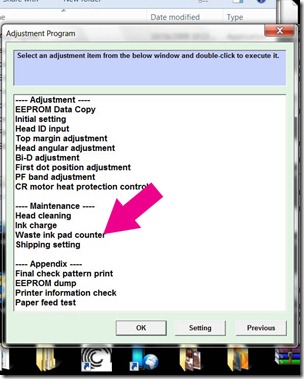
  • Select on “Waste ink pad counter” and click “OK” button
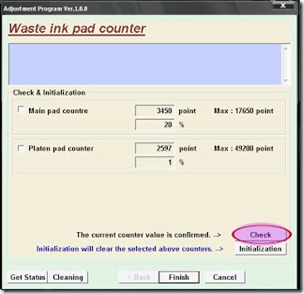
  • Check on Main pad counter and click on “Initialization” button to reset the counter to 0
  • Turn off the printer as a program instructed then turn on again
  • Its done!
Epson Stylus TX320f End of service life eror

Epson Stylus TX320f End of service life eror

Troubleshoot the Printer problem "parts inside printer near end service life” or “parts inside printer end of service life”, but before follow the procedure, make sure that the power of the printer is on, usb cord properly connected to your computer and most of all there’s no pending print task in your printer. Download Windows 7 Epson resetter here. This program is for Epson Printer with a model Epson Stylus TX320f.

Just Follow the steps below after you finish download the epson resetter :
  • Open program
  • Click Accept
  • Click Select button, and click your printer model
  • Click "OK"
  • Click the Particular Adjustment Mode
  • Select Waste ink pad counter
  • Click OK
  • Click Initialization (this will reset counter)
  • Turn off the printer
  • Then turn on again.
Epson Perfection V750 m PRO scanner Manual Pdf

Epson Perfection V750 m PRO scanner Manual Pdf

Carefully read and follow all safety instructions supplied by the manufacturer, including recommended procedures for the processing and use. Proper handling and use of fluids for mounting the other scanner and understanding of all the potential risk is solely customers responsibility. Epson makes no representations does not assume responsibility for any damage, risks, and potential health and safety problems, which may result from their use.Put a drop or two of mounting fluid on the glass tray where you want to mount your movie. Only a few drops are needed off the mountain, six framework 35 mm tape.

Note: must work more quickly, so that the mounting liquid do not avaporate Clear mounting film is placed on top. Use cloth or glove hands to press inward to the edges to remove trapped air bubbles. Lift the fluid mount tray outside Guide and place it on the scanner. Orient it so that the tray is close to the background of the scanner. Select the scan for each picture individually, is to select only the image itself and not the surrounding area. Then you can make any adjustments to the image before scanning.

See your user guide for details. Epson Perfection V750 Download-m PRO scanner-with the help of your accessory for mounting the Epson liquid

Epson Stylus TX410 to Epson TX415 end of service life error

Epson Stylus TX410 to Epson TX415 end of service life error

Epson Stylus TX410 and Epson TX415 printer problem parts inside printer near end service life, parts inside printer end of service life or ink overflow error.

Follow the steps below:
  • Open program, Click Accept
  • Click Select button, and click your printer model,  Click "OK"
  • Click the Particular Adjustment Mode
  • Select Waste ink pad counter, Click OK
  • Click Initialization (this will reset counter)
  • Turn off the printer , then turn on again.
Finish
Epson Resetter for Windows XP and Windows 7 here to download
Epson Stylus Tx300f near end of service life error

Epson Stylus Tx300f near end of service life error

Troubleshoot the Epson Stylus Tx300f  Printer with a problem of "parts inside printer near end service life” or “parts inside printer end of service life”, but before follow the procedure, make sure that the power of the printer is on, usb cord properly connected to your computer and most of all there’s no pending print task in your computer. Download  utility  Windows 7 32 bit or Windows XP compatible epson resetter. If it wont work to Windows 7, just right click the program and set to compatibility mode

Follow the steps below:

Click to
  • Open AdjProg.exe
  • Click Accept
  • Click Select button, and click your printer model
  • Click "OK"
  • Click the Particular Adjustment Mode
  • Select Waste ink pad counter
  • Click OK
  • Click Initialization (this will reset counter)
  • Turn off the printer
  • Then turn on again.
Done

Epson T50 End of service Life Error

Before opening the Epson adjusment “Adjprog.exe”, adjust first the date of your computer depending of wat kind of Epson Resetter did you have. And make sure there is no pending print task in your personal computer to your printer. Download epson resetter here.   I advise the windows XP program  or Windows 7 32 bit to use this epson resetter. This program might also work to Epson Stylus P60

Open the Adjprog.exe. Click “Accept” button to open the program


Click "Select" button. and choose your printer model then click "OK"
particular
Click “Particular adjustment mode” button.
pad
Select on “Waste ink pad counter” and click “OK” button
initialize
Check on Main pad counter and click on “Initialization” button and the program will reset the protection counter.
  • Turn off the printer as a program instructed then turn on again
  • Finish !
I used the same images of resetter because I don’t have time to open all the program and take a screenshot. Almost all of Epson adjustment program menu is identical. 

Epson RX650 end of service life error

Repair the error parts inside printer end service life or, parts inside printer near end of service life.rx650
Before opening the Epson resetter program, adjust first the date of your computer depending of what kind of Epson Resetter did you have. And make sure there is no pending print task in your printer. This program is for the Epson Printer with a model of Epson RX650 .
Folow the steps below:
  • Open AdjProg.exe
  • Click Accept
  • Click Select button, and click your printer model
  • Click "OK"
  • Click the Particular Adjustment Mode
  • Select Waste ink pad counter
  • Click OK
  • Click Initialization (this will reset counter)
  • Turn off the printer
  • Then turn on again.
Finish.

Click here to  epson resetter download

Epson ME30 End of Service life Repair

Fix and Troubleshoot the error of  your Printer with a model Of Epson ME 30 with a problem "parts inside printer near end service life” or “parts inside printer end of service life”. Before following the procedure, make sure that the power of the printer is on, usb cable (cord) properly connected to your personal computer or laptop and most of all there’s no pending print task in your printer. I recommend Windows XP Desktop Computer Notebook PC Operating Systen

The Model of Epson ME30 Printer

me30printer

Follow the steps below:
  • Open AdjProg.exe
  • Click Accept
  • Click Select button, and click your printer model
  • Click "OK"
  • Click the Particular Adjustment Mode
  • Select Waste ink pad counter
  • Click OK
  • Click Initialization (this will reset counter)
  • Turn off the printer
  • Then turn on again.
Done

Click here to download the epson resetter